

 Posts
Posts


Thanks to the power of technology, council continues to meet monthly. Did you know our council members live throughout Ontario, from North Bay, to London; Paris to Toronto; Guelph to Waterloo? We alternate our meetings from virtual to in person; some people dial in monthly. Our newest volunteer, Sylvia Squair, is our new liaison in London with University of Western Ontario and Fanshaw College. Our winter has been busy with event planning topping the monthly agendas:
Education days:
We’re still finalizing instructors for our Education days this spring. We are working on the same profit sharing model we established last year. We bandied about a number of topics and finally narrowed it down to content reuse and working with agile development.
Monthly events:
We are continuing to plan for a Webinar in the months we do not have an education evening. However, we did cancel February due to lack of interest.
Awards night:
Our annual Awards night is scheduled for March 30 at the Davis Centre. We’ll be presenting the Heidi Thiessen Memorial scholarship, Publication Competition awards, Summit award (drawing will take place that night) and Distinguished Chapter Service Award. Fei Min is looking into bringing the STC Travelling Road Show to the event. The road show showcases the International Competition winners from last year.
Annual General Meeting:
In June, we’ll have our Annual General Meeting and are looking for a speaker.
Other items of interest:
• Student competition is underway. We posted notices in London, Toronto, Waterloo and Guelph. Judging will begin shortly.
• Technical publications judging was completed in conjunction with the Toronto chapter, in one day. One entry in the group will go on to the International competition. Nancy will arrange to have the certificates for our chapter winners ready for the awards night.
• We finalized and rolled out the participation game. See our website for the current leaders.
• We’ve purchased an early bird registration to the Summit (transferable) that will be awarded to one volunteer at the Awards night. The person selected is expected to attend the Leadership day, write an article on the Summit and present a seminar on their learnings.
• We discussed the best way to communicate to members and decided to use a variety of options so people can pick the one that best suits them. With that in mind, we’ve set up Linked-in and Twitter accounts.
• The STC launched their new website. In future we will be able to set up a micro-site on the site. At that point, we’ll investigate how best to tap into this.
• Communitech representatives have attended some council meetings. Avvey Peters is our new Communitech liaison.
• As of year end (2010) our chapter membership is at 73 people.
• The audit has been completed on our 2010 financial statement.
• We’re pursuing sponsorship options with Front Runner.
• STC elections are coming soon. We’ll provide election information on the Blog and website. There are several international candidates including Canada’s Bernard Aschwanden running this year.
• And last but not least, our February council meeting was completed in a record breaking sixty one minutes!
Carol Lawless
Secretary
Southwestern Ontario Chapter STC
Saturday, February 19, 2011


Thursday, February 10, 2011
STC’s International Candidates
My fourteen years of STC membership have undoubtedly provided excellent professional development value, from a local perspective.
Initially, I relied on STC for contacts in my neighborhood to help me become established in the profession. As I grew in confidence and experience, I joined my chapter executive and tried to pay it forward by helping to provide a platform for new tech writers, as others had done for me.
The work is rewarding, and my colleagues on our chapter executive are first-class. So I guess you could say, I love the STC.
But at the international level, I have certainly felt some frustration. A particular sore spot for me is the way this international organization seems to remain firmly focused on what happens within the United States.
In 2010, I joined first the Community Funding and Support Task Force, and then the Community Affairs Committee, to help define the kinds and quantities of support that would most benefit our chapters and SIGs. My particular interest was the full inclusion of international members.
I participated out of concern that STC membership fees purported to provide a number of benefits that weren’t practical (US-centric job bank and salary data) or weren’t available (insurance) to international members. During our sessions, I learned that even within the US, rules vary so much from state to state that things are not substantially better for Americans!
At the Dallas conference in 2010, the Community Funding and Support Task Force summarized a number of recommendations. Many of these ideas are now being put into practice, and I hope they will benefit all STC members.
I believe that the STC executive genuinely desire to improve the value of STC memberships for all members, but change is always hard. Even characterizing myself as an “international” member suggests that “American” is the default position – exactly the perception I am struggling against.
But my experience on these committees has helped me see that the STC needs leadership from its international members, before it can become the organization it is striving to be.
In the upcoming STC election, we have a chance to vote for two international candidates. Bernard Aschwanden (Canada) and Ray Gallon (France) are both running for election as Directors of our Society.
I believe that the fresh perspectives these experienced members bring can help the STC transform itself into a truly international organization.
So when you vote for your new Society Officers between March 9 and March 30 this year, ask yourself whether the STC could use a helping hand from some international candidates.
And if you agree, then remember: Bernard and Ray are willing to step up and help us all.
Thank you,
Tracey Martinsen
Tracey Martinsen has been a member of the STC (Canada West Coast) since 1997.
Initially, I relied on STC for contacts in my neighborhood to help me become established in the profession. As I grew in confidence and experience, I joined my chapter executive and tried to pay it forward by helping to provide a platform for new tech writers, as others had done for me.
The work is rewarding, and my colleagues on our chapter executive are first-class. So I guess you could say, I love the STC.
But at the international level, I have certainly felt some frustration. A particular sore spot for me is the way this international organization seems to remain firmly focused on what happens within the United States.
In 2010, I joined first the Community Funding and Support Task Force, and then the Community Affairs Committee, to help define the kinds and quantities of support that would most benefit our chapters and SIGs. My particular interest was the full inclusion of international members.
I participated out of concern that STC membership fees purported to provide a number of benefits that weren’t practical (US-centric job bank and salary data) or weren’t available (insurance) to international members. During our sessions, I learned that even within the US, rules vary so much from state to state that things are not substantially better for Americans!
At the Dallas conference in 2010, the Community Funding and Support Task Force summarized a number of recommendations. Many of these ideas are now being put into practice, and I hope they will benefit all STC members.
I believe that the STC executive genuinely desire to improve the value of STC memberships for all members, but change is always hard. Even characterizing myself as an “international” member suggests that “American” is the default position – exactly the perception I am struggling against.
But my experience on these committees has helped me see that the STC needs leadership from its international members, before it can become the organization it is striving to be.
In the upcoming STC election, we have a chance to vote for two international candidates. Bernard Aschwanden (Canada) and Ray Gallon (France) are both running for election as Directors of our Society.
I believe that the fresh perspectives these experienced members bring can help the STC transform itself into a truly international organization.
So when you vote for your new Society Officers between March 9 and March 30 this year, ask yourself whether the STC could use a helping hand from some international candidates.
And if you agree, then remember: Bernard and Ray are willing to step up and help us all.
Thank you,
Tracey Martinsen
Tracey Martinsen has been a member of the STC (Canada West Coast) since 1997.
Friday, January 21, 2011
Education Evening: Arbortext Service Information Solution
By Kaitlin Ojamae
If you’re using Adobe® Technical Communication Suite for your documentation projects – or perhaps grinding away with the Microsoft Office® suite like I am – prepare to be impressed by the Arbortext Service Information System.
An hour was not enough time for our presenters, Richard Ernst and Anthony Villa, to showcase all the tools and functionalities of this system. In fact, two hours were not enough to do it justice! The information-rich presentation was punctuated by our members’ sighs of, “Oh that’s wonderful,” and “Oh, that would make things so much easier!”
Overview of the Arbortext Service Information System
Anthony Villa, President of Newbook, credits the success of Arbortext to the manner in which all the components are connected in a fully integrated system; the product and all its information is centralized in one place, so users avoid delays most commonly caused by the inability to locate up-to-date information.
“If it’s not connected back to the product data, you lose the connection to the product data itself,” Villa explains.
As technical communicators, we are all familiar with the frustrations of lost requirements and valuable time wasted by information hunting. As an all-in-one solution, Arbotext allows you to “go to the source” of the product itself. For example, if you need information fast, simply do a query and get a list of information – you can then decide what format you want the information in. It is all associated with the content, which drives efficiencies, like a feedback system.
Villa admits that the system is “not perfect,” but it connects people with the data, and the data with the products.
The Integrated Tools
We were fortunate to get a demonstration, from Training Coordinator Richard Ernst, of the five tools that comprise the system. Ernst went through the stages of a typical documentation project, to showcase the system and how it encompasses all the phases of documentation (authoring, illustrating, revising and updating, styling, collaborating and reviewing, publishing).
The Arbortext Editor allows you to create content, edit and collaborate globally. The interface allows you to integrate text and illustrations, DITA maps and concepts. In fact, the system is designed to work with DITA. You can insert mark-ups and view tags – it even has a handy quick tag menu to make authoring more efficient. You can copy and paste from anything, including the web, PDF, Word, etc. When creating DITA maps, you can either layout the structure of the document or assemble the topics into a structure (working up or working down).
Revision and change management is easy – everything uses an associative link, so when you change a topic or illustration in any document (or tool), all files containing the same topic or illustration can also be updated automatically (if you want them to).
When you close the application, it retains your preferences of how you like to work (e.g.: with tags visible) for the next time you open it. These are just a few of the features that make the Arbortext Editor more intelligent than the average editor.
The Arbortext IsoDraw is CAD neutral and standard for technical illustration. You can work in 2D or 3D, in perspective or go to plane view; you can even work with legacy drawings and draw on the existing perspective planes. IsoDraw supports any export file type (even ones you haven’t seen since 1996). Your 3D CAD models can be made to match the grid and repurposed for different audiences and documents. Animations can also be made from existing 3D CAD models and played within the Arbortext Editor (there were many OOOs and AHHs at this point in the demonstration).
Another feature to give your illustrations an artistic flair – IsoDraw maintains thick and thin pen strokes in legacy drawings, even as you edit them.
The Arbortext Styler allows you to define many different stylesheets to apply to your content. Using these dynamic stylesheets, you can ensure that the information published is consistent across all media types. If you choose, you can create a master stylesheet to apply to multiple channels or enable multiple delivery formats (web, print, PDF, Word, HTML Help). You can also apply style rules from DITA or other standards.
The Arbortext Publishing Engine can take the same content and publish it to multiple outputs such as the web, PDF, Word, DVD, CD-ROM, and HTML Help. Using the engine, you can choose from multiple document layouts such as two-column or single column, fold-out page formats, or automatic styling. Of course, front and back matter can be automatically generated, including tables of contents, list of figures, and indexes.
Arbortext also has a Content Manager, although it is not required in order to use the tools and get most of their benefit.
For more information on the Arbortext Service Information System (because you know that this single blog article barely scratches the surface of what this robust system can do), check out Newbook’s website.
Wednesday, December 15, 2010
7 Simple Steps to DITA
By Lori Jamieson

At our November meeting, Tim Grantham from Front Runner Training offered a practical training session on what might be considered herding ducks – making documents line up nicely into a row so they can be moved into and managed in DITA.
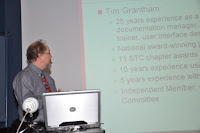
In his “7 Simple Steps to DITA” talk, Tim acknowledged that simple rarely means easy, but encouraged us to cling to the goal of using DITA to achieve productivity gains. “There’s a lot of wasted energy in managing conventional documents,” Tim says. That includes manually reformatting translated documents, manually copying and pasting content from one document to another, manually updating copies of content in multiple documents and manually converting documents from one proprietary format to another.
So what’s Tim’s recommended starting point? “Identify a common document type. Really dig in to find the documents that belong together... the shorter and more commonly used the better. His next steps?
Step 2 – Identify the structural elements common to most instances of the document type. For a product brochure, this might be title, product, value proposition, features and benefits, contact information.
Step 3 – Identify common content.
Step 4 – Identify unique content. Example: product name will be different from one brochure to the next.
Step 5 - Define a form or content template for each document type.
Define variables/ properties for fragments of content that occur frequently within an instance of the document type.
Step 6: Once you have standardized structure, then standardize content. Find chunks of content that are the same everywhere they are used.
Step 7: Standardize formatting. Keep paragraph, character, table styles as simple as possible.
Other hints for beginners: Use only defined styles. Define the number of text styles that you really need and resist every urge to start customizing. Define styles for structural elements – titles, images, terms, cross-references.
Tim’s recommendations for additional investigation: DITA Open Toolkit, a software add-on that can apply formatting to content. Tim says it is fast and reliable but that customizing the default formats is complicated for non-technical users. He also recommends Introduction to DITA, a new book by JoAnn Hackos.
Monday, November 29, 2010
2011: A Year of Renewal
By Robert Cundari
With the final days and weeks of 2010 winding down and the heavy weight of the global economic crisis finally becoming less detrimental to our recognized way of life, ask yourself “Have I chosen the right professional tools to promote my career in 2011?”
As technical communicators, we recognize and seize opportunities to enhance our skills as often as we can. With that in mind, the STC is once again encouraging all current members to renew their memberships for 2011 as soon as possible - to receive the most “bang for your buck”. With several head-office run initiatives and our local chapter incentives, there simply isn’t a better time to renew your STC and local chapter memberships.
Here is a summary of the joint incentives:
1. STC-sponsored Community Horse Race – prizes are awarded to the chapters that achieve the highest renewal rate in the first quarter of 2011.2. Prize giveaways upon membership renewal including iPods, Kindle e-readers, etc.
3. Member-Get-a-Member referral program to receive up to $50 off your membership (See STC's Member-Get-a-Member page for recruiting tips, sample emails to send to colleagues, talking points, and more.)
4. Southwestern Ontario Chapter-sponsored Participation Contest – points are awarded for membership renewal, referrals, event participation, etc. – Prizes will be handed out at the AGM to the top three “point-getters”. Monthly results of the contest will be posted on the STC-SOC website.
Time is Running Out ....
Current members, remember that your membership expires December 31, 2010. Membership renewals have begun in earnest and for those considering renewal, you can do so by clicking on the RENEW button at:
http://www.stc.org/membership/renew-your-stc-membership.asp
Renew your STC membership with the Southwestern Ontario Chapter before December 31st and receive 50 points towards the Participation Contest.
What are you waiting for?
Friday, November 19, 2010
Technical Communication Tools Education Evening
By Sam (Suman) Saha
The Education Evening was held in "progression" format, where each expert hosted a table, and attendees choose the table based on their level of interest. The attendees switched between the various tables according to the degree of detail desired.
The presenters were:
 Julia Oulette - Adobe Illustrator Peter Kehoe - Adobe Photoshop Shannon Lerner - Adobe Acrobat David Jaarsma - Microsoft Word Jessie-Lee Schwartz - Microsoft Word Bernard Aschwanden - Framemaker Christine McKarney - Robohelp
Feedback received from some of the attendees is below:
Sam:
 Adobe Illustrator
Debbie:
I don't know quite what I expected from the Tools progression, but it provided everything I wanted and more. I attended the Adobe Acrobat, Advanced Word, and Illustrator sessions.
 The Adobe Acrobat session was an eye-opener. Most of my exposure to the product was for creating PDFs. Little did I know that there were so many other functions that I had never even explored. I watched as presenter, Shannon Lerner, walked through the process of having multiple authors provide feedback on one document. She also demonstrated the steps to creating forms. While I have seen forms created in other applications, I have never seen it done in Acrobat.
As for Word, I have just started to use Word 2007 so I figured I would be learning something new about this version. I was not disappointed. For example, while I know about macros I have not used them very effectively. David Jaarsma showed me the light. He demonstrated several macros that he had created. Frankly, I hadn't even considered developing a macro so that I could create a table to meet the company standards and in only one step. Jessie-Lee Schwartzalso offered her expertise. It was great how she worked with David so that the information they provided complemented each other so that you were doubling the amount of information received in a relatively short time.
Illustrator and Photoshop are not applications that I use every day. In fact, they are applications that I would love to use. Presenter Julia Oulette showed me why my interest is justified. While my focus has always been on Photoshop, it was great to see what Illustrator can do. I could immediately see how it could be extremely useful for technical communication. While I am used to looking at a picture as a whole, I have a new found interest in vectors and what you can do once a picture is broken into parts.
Overall, the Technical Communication Tools Education Evening was definitely an eye opener about the various tools that are used in producing high quality user friendly help guides and documents. For more information about the Education Evening, please visit http://stc-soc.org/calendar/Sept13Bios.php
The Southwestern Ontario Chapter of the STC presented an Education Evening on Tuesday, September 15th 2010 featuring many of the common applications that technical communicators use at their jobs. The SMEs (Subject Matter Experts) readily answered questions related to the tools, highlighted the relative strengths and weaknesses of these tools, and provided tips and tricks for their use.
The Education Evening was held in "progression" format, where each expert hosted a table, and attendees choose the table based on their level of interest. The attendees switched between the various tables according to the degree of detail desired.
The presenters were:
Julia Oulette - Adobe Illustrator Peter Kehoe - Adobe Photoshop Shannon Lerner - Adobe Acrobat David Jaarsma - Microsoft Word Jessie-Lee Schwartz - Microsoft Word Bernard Aschwanden - Framemaker Christine McKarney - RobohelpFeedback received from some of the attendees is below:
Fei Min:
 Advanced MS Word

The coolest thing that I learned is that there is a RefStyle in the field codes. If you create a unique paragraph style, then a template user can type in that paragraph and whatever they type will appear wherever you’ve used the RefStyle field. This makes filling in document information like the author, date and version really easy, and that information can be displayed on every page in the footer. Jessie-Lee and David had plenty of neat tricks to show.
 Adobe Photoshop
This program has so many cool things that it’s hard to pick just one. I guess my favorite was using Image > Adjustments > Shadows/Highlights to fix a photograph when the lighting was too dark or too bright. It works better than using Brightness/Contrast. Julia demonstrated this on a picture where there was a black lump on a sofa, and with one click on the Shadows/Highlights dialogue, you saw that the black lump was really a dog.
 RoboHelp
Christine showed me how she is using RoboHelp at work right now, and pointed out what it can and can’t do. Their source files are in HTML, and they use RoboHelp to organize the HTML files into an online help system, with a few special features courtesy of Java scripts. RoboHelp also promotes the re-use of text by supporting shared text with “snippets”, conditional text and variables.
Sam:
Robohelp
I was amazed to see that Robohelp has progressed so much since the time I last worked on it, which was about 5 years ago. It is much more user-friendly, and comes with a lot more functionalities. Christine demonstrated the various ways Robohelp can be manipulated to produce awesome documents, which was really great!! I look forward to working with Robohelp again very soon.
Adobe IllustratorAlthough I never had a chance to work with Adobe Illustrator before, going forward I would definitely love to work with this particular tool. The features and functionalities are a great help for any writer in the business of creating user friendly documents. Never knew that a picture can be broken down and manipulated in so many ways to suit the end user’s needs. Really awesome!!
Debbie:
I don't know quite what I expected from the Tools progression, but it provided everything I wanted and more. I attended the Adobe Acrobat, Advanced Word, and Illustrator sessions.
The Adobe Acrobat session was an eye-opener. Most of my exposure to the product was for creating PDFs. Little did I know that there were so many other functions that I had never even explored. I watched as presenter, Shannon Lerner, walked through the process of having multiple authors provide feedback on one document. She also demonstrated the steps to creating forms. While I have seen forms created in other applications, I have never seen it done in Acrobat.Illustrator and Photoshop are not applications that I use every day. In fact, they are applications that I would love to use. Presenter Julia Oulette showed me why my interest is justified. While my focus has always been on Photoshop, it was great to see what Illustrator can do. I could immediately see how it could be extremely useful for technical communication. While I am used to looking at a picture as a whole, I have a new found interest in vectors and what you can do once a picture is broken into parts.Overall, the Technical Communication Tools Education Evening was definitely an eye opener about the various tools that are used in producing high quality user friendly help guides and documents. For more information about the Education Evening, please visit http://stc-soc.org/calendar/Sept13Bios.php
Thursday, November 4, 2010
What has the STC – SOC Council been up to?
Meeting monthly, Council and chapter members discuss and plan activities that promote the STC mission and help support the chapter’s vibrant membership with events and education evenings.
Briefly, here are the highlights of what has happened over the past two months:
The community partnership with Communitech is now established: Included in this partnership is joint meeting participation, joint website promotion and dedicated liaisons who ensure an ongoing communication link.
The Participation Game criteria will soon be finalised: The game’s objective is to track and reward member and non-member contributions to chapter activities.
The Technology Spotlight: Look for our chapter’s advertisement in the Who’s Who section of this publication.
Social Media: We plan to set up chapter profiles in Twitter, LinkedIn and Google Groups to help improve our visibility and offer you more flexibility in obtaining your chapter updates.
2010/11 STC Regional Competition: We’ve joined with the Toronto chapter again to determine the region’s best technical publications and online communications.
Heidi Thiessen Memorial Award: There are revised rules; promotion will begin in November and the entrant deadline will be set for January 2011. Final details will be advertised shortly.
Education evenings: The November evening will feature Tim Grantham as he talks about how to get all the benefits of DITA (Darwin Information Typing Architecture) without the pain. The agenda for January’s session is being developed.
Spring Workshop: Planning is underway for our annual workshop in the spring. Think about budgeting for this event now. Stay tuned for details!
As you can see the Council, chapter members and volunteers have been busy getting things done. Check back shortly to see where their hard work and dedication is leading the chapter.
Subscribe to:
Comments (Atom)

